
Standard vs Premium vs Private: separate annual fees from rewards
On 2026-10-06 we checked the public membership pricing on KAST’s homepage and card page. Detailed FX, ATM, delivery and transfer figures below retain their 2026-10-01 check date: the detailed help pages could not be reverified on October 6. Do not treat the article update as a fresh confirmation of every fee. Check the applicable quote in the app before acting.
| Tier | Annual fee (USD) | Displayed cashback | KAST Points |
|---|---|---|---|
| Standard | Free | 1.5% | None |
| Premium | 1,000 / year | 2% | +1% in points |
| Private | 10,000 / year | 3% | +2% in points |
Premium costs US$1,000 a year and Private US$10,000. KAST Points are separate from USD cashback: do not describe Premium as 3% cash or Private as 5% cash by adding them together. Confirm eligible purchases, monthly caps and refund treatment before estimating rewards.
For a Standard vs Premium comparison, list your annual eligible spending and payment currencies first. Separate the additional annual fee, FX, asset-conversion costs, delivery and ATM use, then compare only benefits you would actually use. Do not give points an assumed cash value or claim that the upgrade pays for itself without checking caps and exclusions.
Save the membership price and renewal terms, the funding asset and network, the conversion quote, physical-card delivery charge, transaction currency, FX and USD-cashback eligible amount. Converting a deposited asset and converting a card purchase from a non-USD currency are different steps and may have different costs.
- Stablecoin deposits: converted to USD at 1:1 with 0% spread. Blockchain network fees still apply on the sending side.
- Other tokens (BTC, ETH, SOL and so on): automatically converted to stablecoins. The fee varies by token and is shown in the app before you confirm.
- Card spend in USD: 0%. Top-ups, Apple Pay and Google Pay are also 0%.
- Card spend in any other currency: the live market exchange rate plus a 0.5–1.75% FX fee, depending on your country of residence, where the purchase happens and the card program. Non-USD purchases under $25 also cost $0.10.
- ATM: $3 + 2% per withdrawal, plus the FX fee outside USD. Limit: $250 per withdrawal and $750 per 24 hours in the ATM limits article (updated 2026-08-09), but $500 and $1,500 in the fees article (updated 2026-10-12); check the app and plan on $250.
- Membership: Standard $0, Premium $1,000 a year, Private $10,000 a year. A Standard physical card costs $40 to deliver.
- Declined for insufficient balance: $0.50.
Source: KAST help centre, What Are the Fees and Conditions for KAST Cards and Accounts? (updated 2026-09-01), and Can I Use My KAST Card to Pay in Different Currencies? (updated 2026-08-09), both checked 2026-10-01.
How to read the KAST fee page
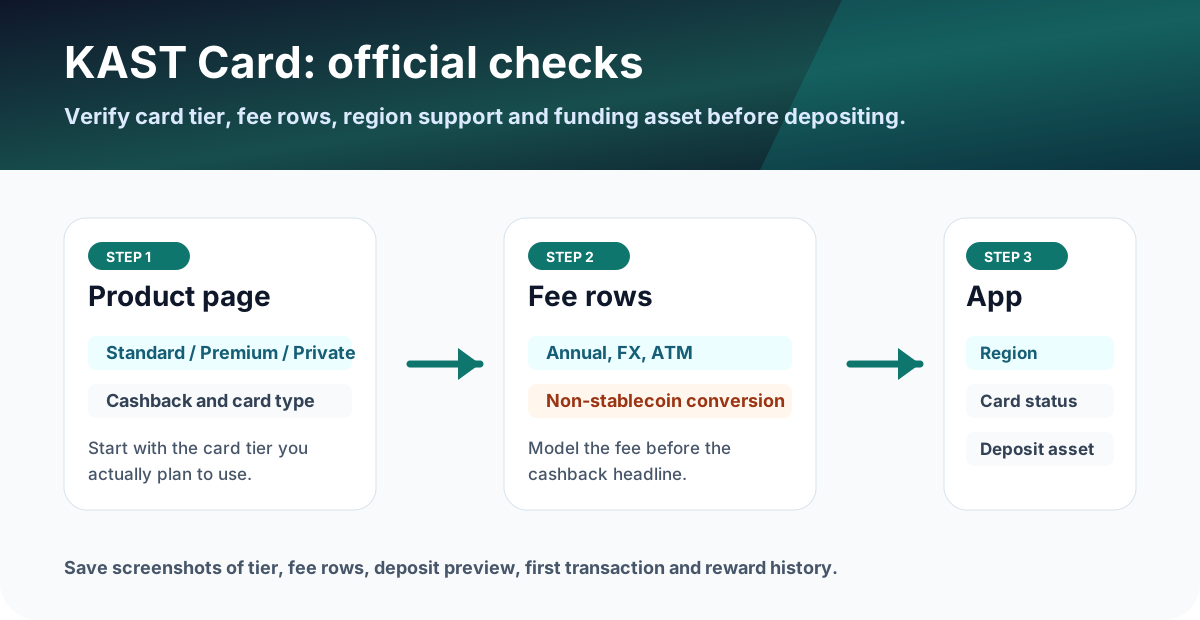
Read the fee page from top to bottom instead of only checking annual fee. The real cost is often in the rows below the tier price.
Membership tiers to compare first
The official fee page, updated 2026-09-01 and checked 2026-10-01, lists Standard at $0 annual fee, Premium at $1,000 per year, and Private at $10,000 per year. Standard includes 2 cards; each additional Standard virtual card costs $2, and in some regions a $2 issuance fee also applies to the included virtual cards. A Standard physical card costs $40 to deliver. Whether cashback covers a paid tier is worked through in the KAST cashback breakeven section of our review.
| Tier | Cost headline | Reward headline | Best check |
|---|---|---|---|
| Standard | $0 annual fee | 1.5% USD cashback on the first $2,000/month | $40 physical-card shipping, FX, ATM |
| Premium | $1,000/year | 2% USD cashback on the first $10,000/month plus 1% KAST Points | Monthly spend needed to justify fee |
| Private | $10,000/year | 3% USD cashback on the first $40,000/month plus 2% KAST Points | Only makes sense for very high spenders who can verify all terms |
KAST card conversion rate and FX fees
For USD card spend, KAST lists a 0% card-spend and transaction fee. For spending in any other currency, KAST's currency article says the card converts at the live market exchange rate at the moment the transaction is processed, then adds a foreign exchange fee of 0.5–1.75%. The fee page says the exact percentage can depend on your country of residence, the country where the purchase happens, the card program, and the fee shown in the app. Non-USD transactions under $25 also carry a $0.10 small-transaction fee.
If you searched for the KAST card conversion rate, there are three separate rows to check: stablecoin deposit conversion, non-stablecoin deposit conversion, and non-USD card spending. Stablecoin deposits convert to USD at 1:1 with 0% spread. Non-stablecoin deposits are auto-converted to stablecoins with a fee that varies by token and is shown in the app before you confirm. Non-USD purchases then pay the FX fee above.
| Non-USD purchase | KAST FX fee at 0.5% | KAST FX fee at 1.75% | Small-transaction fee |
|---|---|---|---|
| $20 | $0.10 | $0.35 | $0.10 (under $25) |
| $100 | $0.50 | $1.75 | None |
| $1,000 | $5.00 | $17.50 | None |
Our arithmetic from KAST's published rates, before cashback. Your exact percentage is shown in the app before you confirm.
At the listed 0.5–1.75% FX range, the fee depends on residence country and transaction country.
Use this only for supported stablecoins; non-stablecoin deposits use a different conversion row.
Always pay in the local currency. When a card terminal or checkout offers to charge you "in USD", decline it. KAST's help article warns that third-party "pay in USD" conversions often carry markups far above its own 0.5–1.75% fee. Paying in the local currency keeps the conversion within KAST's range. The 0% FX promotion for selected markets ended on August 31, 2026; spending from September 1, 2026 pays the standard FX fee.
Paying in euros or pounds after leaving Gnosis Pay? The Gnosis Pay alternatives guide compares KAST's FX cost with the other cards available in the EEA and UK.
KAST physical card and Visa card types
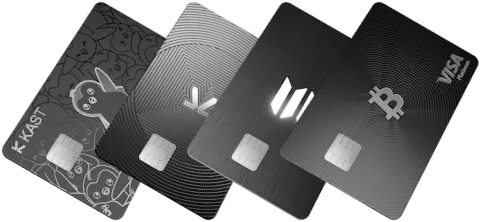
KAST lists physical cards for Standard, Premium and Private tiers, but the cost and card type are not the same. Standard shows a physical-card shipping fee, while higher tiers include the card and charge for additional cards. The official fee page lists Premium Plastic for Standard, Premium Metal for Premium, and gold-plated material for Private.
| Tier | Physical card cost cue | Card material | Visa card type |
|---|---|---|---|
| Standard | Free card with $40 shipping fee | Premium Plastic | VISA Platinum |
| Premium | Included; additional card row applies | Premium Metal | VISA Infinite |
| Private | Included; higher additional-card row applies | Gold plated | VISA Infinite |
Before ordering a physical card, save the tier screen, shipping fee, delivery country, additional-card row and card material shown in the app. A physical card is especially important if you plan to test ATM withdrawals.
Deposit fees: stablecoin vs non-stablecoin
The difference matters. Stablecoin deposits are listed as 0%, while non-stablecoin tokens are auto-converted to stablecoins with a conversion fee that varies by token and is shown in the app before you confirm. If your plan is to deposit BTC, ETH, SOL or another non-stablecoin, the card can be more expensive than it first appears.
KAST ATM withdrawal limit and fee example
KAST's own help pages give two different ATM limits as of 2026-10-13. The ATM limits article (updated 2026-08-09) says $250 per withdrawal including fees and up to 3 withdrawals in a rolling 24-hour period, so $750. The fees and conditions article (updated 2026-10-12) says up to $500 per withdrawal and up to 3 withdrawals or $1,500 per 24-hour period. Check the limit shown in the KAST app before withdrawing and plan around the lower $250 figure to be safe. Under that figure, a $300 cash need cannot be done as one withdrawal; it would need to be split and may trigger additional ATM operator fees.
If the withdrawal is non-USD, add the listed 0.5–1.75% FX range. Local ATM operators may also charge their own fee.
The limits article also says its $250 cap includes fees, that the 24-hour window is rolling, and that the cap can't be raised in the app. ATM withdrawals earn no cashback. The KAST ATM withdrawal limit guide covers the physical vs virtual card question and a safe first withdrawal.
KAST USD bank transfer fees: receiving and sending
KAST also works as a USD account. KAST's help centre (two articles updated 2026-09-14, checked 2026-10-01) lists these fees and limits. The main fee table (updated 2026-09-01) shows slightly different SWIFT figures, which are noted in the table.
| USD bank transfer | ACH | Fedwire | SWIFT | Limits and notes |
|---|---|---|---|---|
| Receive into KAST | $2 | $15 | $35 (the fee table says $30) | $10,000 per transfer and $20,000 per month combined. Above that, KAST may ask for proof of income or source of funds within 10 days, or return the transfer. The fee table lists the USD deposit limit as unlimited. |
| Send from KAST | $1 | $15 | $35 (the fee table says $30, or $35 through one provider) | A 0.5% processing fee is waived until the end of 2026 (that is, through December 31, 2026). The fee table adds 0.08% on ACH and wire "where applicable". The SWIFT fee is waived on transfers of $5,000 or more for a limited time; KAST gives no end date. Minimum payout: $2 to US banks, $100 international. |
What we saw on our own account: on 2026-09-25 the KAST app on the site operator's own account, held by a Japan resident, showed a "USD bank transfer" option under Receive. KAST notes that account details may still need review before you can use them, so treat the option appearing as a first step, not proof that transfers will clear. Sender and intermediary banks can also deduct their own fees from SWIFT transfers before the money reaches KAST.
Pre-application checklist
- Confirm country support and card tier in the app.
- Check whether your deposit asset is a supported stablecoin.
- Estimate monthly spend and cashback cap before upgrading tiers.
- Save screenshots of fee rows, physical-card order screen, ATM limit row and card creation status.
Advertising disclosure: the KAST button is our referral link (code JQDMB03P), and we may be paid if you sign up. It does not change the fees on this page.
What to save before and after using the card
- Fee-table screenshot showing the date you checked it.
- Screenshot of the selected tier, physical-card order status, card shipping or extra-card cost.
- Deposit preview showing whether the asset is a stablecoin or non-stablecoin auto-conversion route.
- For non-USD purchases, the transaction detail showing the FX fee, so you can see which rate in the 0.5–1.75% range applies to you.
- ATM screen, ATM receipt and app transaction detail if you test withdrawals.
- For USD bank transfers, the fee and arrival estimate shown before you confirm, plus the amount actually credited.
FAQ
How do KAST Standard and Premium compare?
The public tiers checked on 2026-10-06 show Standard free with 1.5% cashback and Premium at US$1,000 per year with 2% cashback. Premium’s additional 1% in KAST Points is not cash cashback. Check eligible spending and caps in the app.
Were all detailed fees checked again on October 6?
No. The October 6 check covers public membership prices and reward rates. Detailed FX, ATM, shipping and transfer figures retain their October 1 check date and require confirmation in the official app before use.
What is the KAST card conversion rate?
Supported stablecoin deposits convert to USD at a 1:1 rate with 0% spread. Other tokens such as BTC, ETH or SOL are auto-converted to stablecoins with a fee that varies by token and is shown in the app before you confirm. When you spend in a currency other than US dollars, KAST converts at the live market exchange rate when the transaction is processed and adds a 0.5% to 1.75% foreign exchange fee. Checked on KAST's help centre on 2026-10-01.
What FX fee does KAST charge?
Detailed fee record checked on 2026-10-01; confirm the current amount and applicability in the app. KAST charges 0% on US dollar card spending and a 0.5% to 1.75% foreign exchange fee on spending in other currencies. The exact rate can depend on your country of residence, the country where the purchase happens and the card program, and the app shows it before you confirm. Non-USD purchases under $25 also cost $0.10. The 0% FX promotion for selected markets ended on August 31, 2026.
What are the KAST card fees?
Detailed fee record checked on 2026-10-01; confirm the current amount and applicability in the app. Standard membership is free, Premium costs $1,000 a year and Private $10,000 a year. A Standard physical card costs $40 to deliver. Card spend in US dollars, top-ups and Apple Pay or Google Pay are 0%; other currencies add 0.5% to 1.75% FX. ATM withdrawals cost $3 plus 2%. A payment declined for insufficient balance costs $0.50. Stablecoin deposits are free apart from network fees.
What is the KAST ATM withdrawal limit?
As of 2026-10-13 KAST's official help pages disagree. The ATM limits article (updated 2026-08-09) says $250 per withdrawal including fees and up to 3 withdrawals in a rolling 24-hour period, so $750. The fees and conditions article (updated 2026-10-12) says up to $500 per withdrawal and up to 3 withdrawals or $1,500 per 24-hour period. Check the limit shown in the KAST app before withdrawing, and plan around the lower $250 figure to be safe. Each withdrawal costs a $3 flat fee plus 2% of the amount, with an extra 0.5% to 1.75% FX fee for non-USD ATM withdrawals.
How much does KAST charge to send or receive a USD bank transfer?
Detailed fee record checked on 2026-10-01; confirm the current amount and applicability in the app. KAST's help centre (updated 2026-09-14) lists $2 by ACH, $15 by Fedwire and $35 by SWIFT to receive USD, with limits of $10,000 per transfer and $20,000 per month. Sending USD costs $1 by ACH, $15 by Fedwire or $35 by SWIFT, and the 0.5% processing fee is waived until the end of 2026. KAST's main fee table lists SWIFT at $30, so check the fee shown in the app before you confirm.
Does KAST have a physical card?
Detailed fee record checked on 2026-10-01; confirm the current amount and applicability in the app. Yes. The official KAST fee page lists physical cards across Standard, Premium and Private tiers. On Standard the card is free and delivery costs $40, while Premium and Private include a physical card in the membership. Card materials and Visa card types differ by tier.
What should I trust if the app and this page differ?
Before applying, funding, or spending, use the latest official site or in-app screen as the source of truth. Treat this page as a decision checklist and save the live fee, reward, and availability screens.
Official sources checked
Membership prices and headline cashback were checked on the public site on 2026-10-06. Detailed help-page fees retain the 2026-10-01 check date; these pages could not be reverified on October 6. Terms change quickly, so confirm the final fee table, card availability, limits, and campaign terms in the official app or help center before you act.
Official social and update checks
Use official KAST social accounts to catch fee changes, maintenance posts, or campaign updates that may appear before help-center copy is updated.