
All of the dated items on this page are now in the past. KAST Matchday ended on July 19, 2026, KAST Ads Cashback on July 31, 2026 and KAST's 0% FX promotion on August 31, 2026. The Binance Japan Card campaign ended on June 26, 2026. RedotPay opened RLUSD withdrawals on June 9, 2026. Check each issuer's current page before acting on anything below.
As of June 16, 2026, the most actionable crypto card items are MetaMask Card's U.S. signup and Metal order pauses, RedotPay XRP and RLUSD support checks, KAST Matchday 2x cashback (ended July 19, 2026), KAST Ads Cashback for eligible ad spend (ended July 31, 2026), KAST's 0% FX promotion (ended August 31, 2026), Binance Japan Card's campaign (ended June 26, 2026), EPOS CRYPTO Card for bitbank issued-card conditions through June 30, Bitget Wallet Card APAC physical-card and Japan eligibility checks, and Tria's updated card cashback terms. Infrastructure announcements from Mastercard and Visa matter, but they do not replace issuer-level card terms.
Official screens to check before acting
Start with the issuer page or app, then check the exact account screen that controls your next step. For campaigns, the useful evidence is not the headline reward; it is the deadline, eligible user definition, fee row, reward cap, and post-transaction record.
Read the update, then finish the card decision
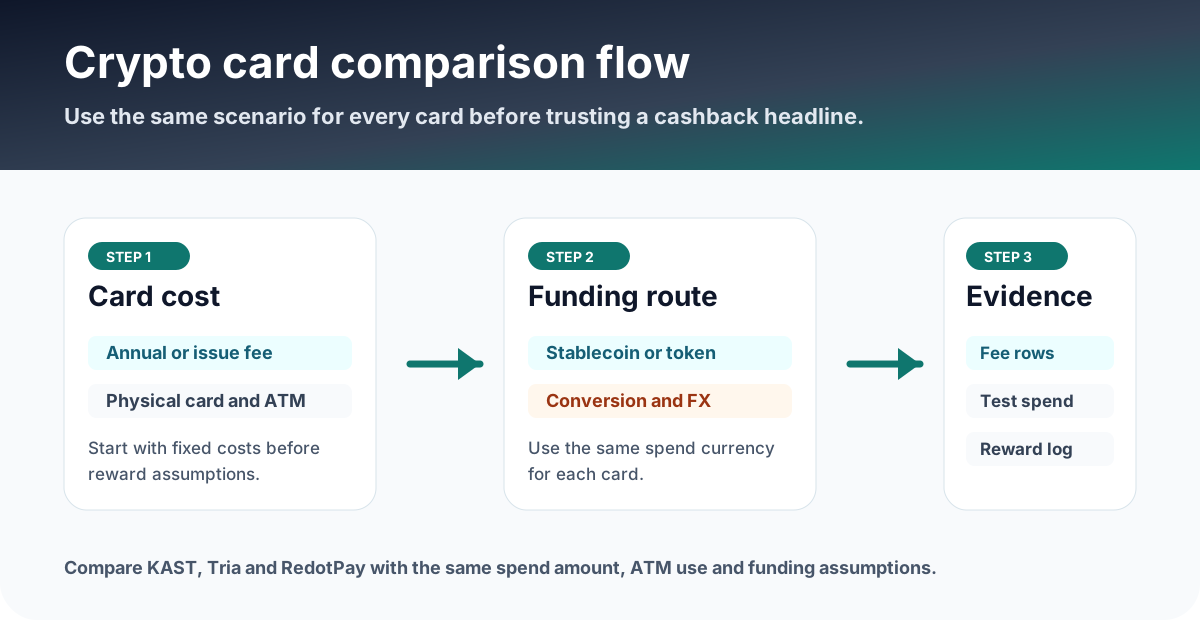
Most June updates only matter if they change one of three actions: applying, funding, or spending. Use the official page first, then compare the card against your real use case.
Open the official source and confirm the date, eligible market, card type, and user-facing condition.
Include FX, conversion, ATM, card subscription, cashback cap, and whether the reward asset is useful to you.
After a small test, save the statement, fee row, transaction amount, reward entry, and support-ready reference number.
Latest crypto card updates
This list keeps issuer-level card actions ahead of broader market announcements. The useful question is whether a reader can now apply, spend, withdraw, compare fees, or save a different record.
June 2026 dates (all now past)
These were the key dates in the June 2026 terms. All of them have passed; they are kept so readers can match past transactions and rewards to the rules that applied at the time.
Stablecoin settlement news: important, but not a card application step yet
Mastercard announced expanded settlement capabilities involving regulated stablecoins, and Visa announced a Brale proof of concept for private stablecoin settlement. These are meaningful payment-infrastructure signals. They do not automatically change a reader's card application, KYC, fees, ATM, Apple Pay, Google Pay, or cashback screen unless the card issuer updates user-facing terms.
Evidence to save before and after using a card
- Official page or help-center screenshot showing the checked date, campaign period, and eligibility row.
- Card tab or application screen showing KYC status, issued card type, fee row, and supported region.
- Deposit or withdrawal screen showing asset, network, minimum amount, fee, and transaction status.
- First small transaction statement showing merchant currency, card currency, converted amount, fee, and reward entry.
- Ads invoice, platform receipt, card statement, settlement timestamp, cashback entry, support ticket number, TXID, statement number, or reward-hub entry if the condition is disputed later.
FAQ
What should I verify before acting on crypto card news?
Open the official site, official help center, or issuer app and confirm the supported region, card availability, KYC status, fee rows, reward terms, campaign deadline, funding method, and card screen before applying or funding.
Which June 2026 dates mattered?
All of the June 2026 dates have passed: RedotPay RLUSD withdrawals opened on June 9, the Binance Japan Card campaign ended on June 26, the EPOS CRYPTO Card for bitbank issued-card condition ended on June 30, KAST Matchday ended on July 19, KAST Ads Cashback ended on July 31, and KAST 0% FX ended on August 31, 2026. Check each issuer's current page for live campaigns.
Why are some official stablecoin settlement announcements not treated as application news?
Mastercard and Visa settlement announcements are important infrastructure signals, but they do not automatically change a reader's card application, KYC, wallet funding, ATM, fee, or cashback screen. Treat them as background until a card issuer updates user-facing terms.
What records should I save after applying, funding, or spending?
Save screenshots of the official terms, application or KYC status, card screen, funding transaction, fee row, statement, Matchday pick and result, 2x cashback window, Ads invoice, Ads card transaction, reward entry, timestamp, currency, amount, and any TXID or statement number. Keep them by month for support and tax review.
Official sources checked
Card terms, region support, rewards, and fees can change. Use these official pages and the issuer app before applying, funding, or making a large transaction.