
- Cashback: 1% back in mUSD on the free Virtual card. Metal advertises 3% on the first $10,000 a year, then 1%, but Metal is closed to new users (orders paused since June 2, 2026).
- Virtual card: free, no annual fee, works with Apple Pay and Google Pay; limits $15,000 a day ($10,000 per transaction) and $1,000 a day at ATMs.
- Fees on Virtual: no fee for a stablecoin in your local currency; 0.5% for a stablecoin in a third currency; 0.875% for other crypto such as wETH; 1% cross-border when the merchant is outside your country; 2% at ATMs.
- Who can get it: residents of 45–48 listed countries. US and UK sign-ups are closed. See MetaMask Card supported countries.
Sources: metamask.io/card, MetaMask's limits and fees page and Metal card page, all checked October 1, 2026.
MetaMask Card sign-ups are closed in the US and UK, the Metal card is closed to new users, and countries outside the official list (Japan, Australia and Singapore, for example) can only join the waitlist. These are the stablecoin cards this site reviews in detail. Each issuer has its own country list, so check eligibility in the app before applying.
- KAST: the Standard tier is free and earns 1.5% USD cashback on the first $2,000 of card spend each month; non-USD spending has a 0.5–1.75% FX fee; works with Apple Pay and Google Pay. KAST review
- RedotPay: one-time 10 USD virtual card or 100 USD physical card, no monthly fee; no fee in the card's own currency, 1.2% in other currencies; Apple Pay after the free card upgrade. Not issued in the US, Mainland China, Singapore, India and other listed countries. RedotPay review
- Tria: Tria ended its free Virtual offer on September 26, 2026. The entry tier, Lite (formerly Virtual), is 20 USD a year with 1.5% cashback on the first 1,000 USD of eligible spend a month, then 0.5%. Tria review
The "Open" buttons are affiliate links; we may earn a commission at no cost to you. Figures checked on October 13, 2026 against each issuer's official pages; the Tria Lite price and cashback come from Tria's membership announcement of September 26, 2026.
What MetaMask Card is
MetaMask describes the card as a debit card linked to your MetaMask wallet. You designate supported tokens, set spending limits, keep access to your funds until a transaction completes, and the available token is converted into fiat at the point of sale.
The official help center separates the product into a free Virtual card and a premium Metal card. On our October 1, 2026 re-check the help center said the card is available for sign-ups as a Virtual card only, Metal is not available to new users (the Metal card page says orders have been paused since June 2, 2026), and sign-ups are closed in the US and, according to metamask.io/card, the UK. Existing Metal holders keep their cards.
Official screens to check before signing up
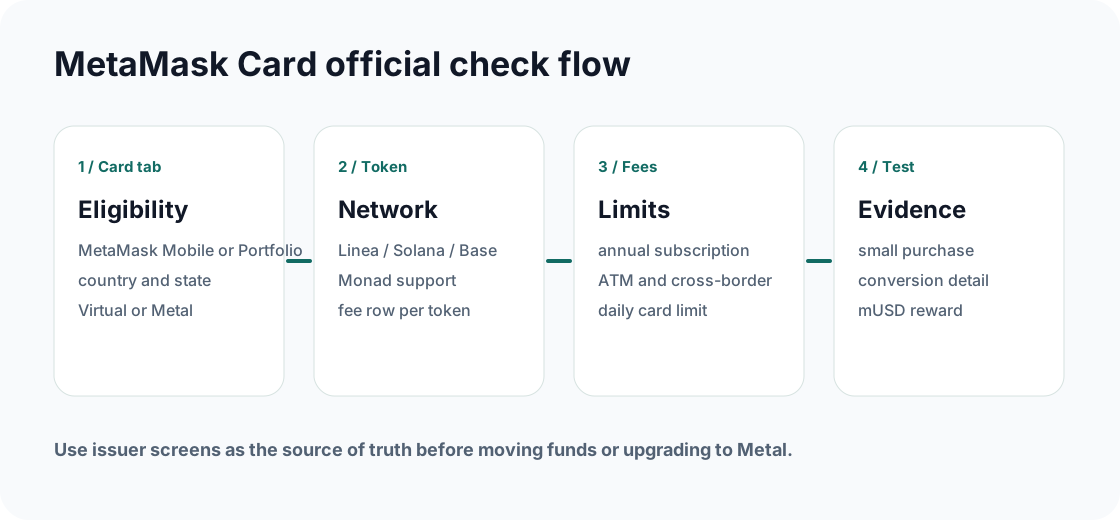
Open MetaMask Mobile or MetaMask Portfolio and check the Card tab before relying on any review. Region, network, token, U.S. signup status, Metal order status, and fee availability are shown in the issuer flow and may be narrower than the global product page.
MetaMask Card fees that change the real cost
The official limits and fees page lists a $0 annual subscription for the Free tier and $199 for the Metal tier. Token fees depend on what you spend: local stablecoin rows can be no-fee, stablecoin mismatches can add 0.5%, DeFi/tokenized-yield assets can be free up to $1,200 per month then 0.5%, and other cryptocurrencies such as wETH are listed at 0.875%.
Network gas is small and variable (the help page shows Linea, typically about $0.01). Cross-border means using the card with a merchant located outside your country of residence, so a 1% fee applies to many online purchases from foreign shops even when the price is in your currency. ATM operators may add their own fee on top of the 2%.
| Fee row | Free Virtual tier | Metal tier |
|---|---|---|
| Annual subscription | $0 | $199 (closed to new users) |
| Stablecoin in local currency | No fee | No fee |
| Stablecoin in a third currency | 0.5% | 0.5% |
| Other crypto spend | 0.875% | 0.875% |
| ATM withdrawal | 2% | No fee up to $1,200/month, then 2% |
| Cross-border | 1% | No fee subject to fair usage |
| Card limits | $10,000/tx and $15,000/day | $20,000/tx and $30,000/day |
| ATM limit | $1,000/tx and $1,000/day | $1,000/tx and $5,000/day |
Scenario: when does Metal break even?
If Metal earns 3% mUSD back on the first $10,000 spent per year while Virtual earns 1%, the extra 2 percentage points are worth up to $200 on that first $10,000, roughly the $199 fee. Metal only pays off through its fee waivers (no cross-border fee, $1,200 a month of free ATM withdrawals) and perks. This is academic for now: Metal is not available to new users.
Rewards can be capped, excluded or changed. Verify the Card benefits screen before paying.Spending USDC on a supported low-cost network is different from spending a token that triggers a crypto fee or requires bridging first.
MetaMask Card cashback: 1% in mUSD
metamask.io/card shows 1% mUSD back on every Virtual card transaction and 3% on the first $10,000 of Metal spend, then 1%. Cashback is paid in mUSD, MetaMask's dollar stablecoin, not in cash to a bank account. Because Metal is closed to new users, plan on 1%: $10 back for every $1,000 spent.
Fees can cancel the reward. Spending wETH costs 0.875% and a foreign merchant adds 1%, so a $1,000 purchase from a foreign shop paid in wETH would cost about $18.75 in fees against $10 back (our arithmetic from MetaMask's fee table). Spending a local-currency stablecoin at a merchant in your own country keeps the full 1%.
Whether you can open the card at all depends on your country: see MetaMask Card supported countries.
Complete the MetaMask Card decision
Do the region and fee checks before moving funds or upgrading to Metal.
Use MetaMask Mobile or Portfolio and confirm account eligibility before comparing benefits.
Choose the token and network you will spend from, then read the exact fee row.
Make a small purchase, check the converted amount, gas, fee breakdown, and mUSD reward.
Evidence to save
- Card tab screenshot showing eligible country, card tier, and application status.
- Supported token and network screen used for the first purchase.
- Limits and fees screen for annual subscription, token fee, ATM and cross-border rows.
- First transaction detail showing merchant currency, converted amount, network fee, and cashback.
FAQ
How much cashback does MetaMask Card give?
The free Virtual card earns 1% back in mUSD, MetaMask's stablecoin. The Metal card earns 3% on the first $10,000 spent a year, then 1%, but Metal orders have been paused since June 2, 2026 and it is not available to new users, so 1% is the rate a new cardholder gets. Checked on metamask.io/card and the Metal card page on October 1, 2026.
What are the MetaMask Card fees?
On the free Virtual card: $0 annual fee, no fee when you spend a stablecoin in your own or the merchant's local currency, 0.5% for a stablecoin in a third currency, 0.875% for other crypto such as wETH, 1% cross-border when the merchant is outside your country, and 2% on ATM withdrawals (the ATM operator may add its own fee). Tokenized-yield assets such as aUSDC are free up to $1,200 a month, then 0.5%. Source: MetaMask's limits and fees page, checked October 1, 2026.
Is the MetaMask virtual card free?
Yes. The Virtual card has no annual fee and is currently the only MetaMask Card new users can sign up for. It works online and through Apple Pay or Google Pay, with limits of $10,000 per transaction, $15,000 a day and $1,000 a day at ATMs. It is only available to residents of MetaMask's supported countries; US and UK sign-ups are closed.
Is MetaMask Card a credit card?
No. MetaMask describes it as a debit card that lets users spend supported wallet assets through Mastercard acceptance.
Can U.S. users sign up or order the Metal card now?
No. On October 1, 2026 MetaMask's card page said sign-ups in the US and the UK are temporarily closed, the help center's US guidance offered only a waitlist, and the Metal card page still said orders have been temporarily paused since June 2, 2026. Existing cardholders can keep using their cards.
Does MetaMask Card support every token in my wallet?
No. MetaMask lists specific supported tokens (including mUSD, USDC, USDT, EURe, GBPe and wETH) on Linea, Solana, Base and Monad, with regional restrictions.
Official sources checked
Card terms, regions, rewards, and fees can change. Use the links below to verify the live issuer pages before applying, funding, or making a large purchase. Fees, cashback, the sign-up pauses and the Metal order pause were re-checked on October 1, 2026.