
Tria Earn should be treated as a yield product, not a guaranteed card benefit. It can be useful for idle assets only if you understand the vault asset, APY variability, withdrawal route, and smart-contract or strategy risk.
Tria's blog post "How to Earn Interest on Stablecoins" (August 7, 2026) quoted USDC on Ethereum at a base 8% APY, up to 10% with a membership boost (then Virtual +0.5%, Signature +1%, Premium +2%). When we opened the Earn screen on October 6, 2026 (15:53 JST, the site operator's Japan-resident account), USDC on ETH showed a Target APY of 7.18% with a +2% boost next to it, a $10 minimum deposit, no lock-in period and flexible duration.
The base rate has dropped from 8% to 7.18%. A target APY is not guaranteed and moves with demand; the boost depends on your membership plan, so check your own Earn screen before depositing.
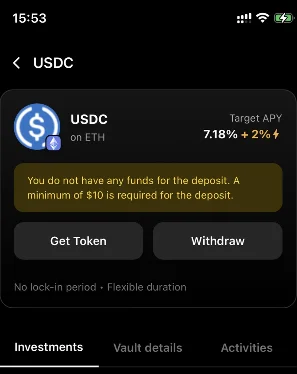
Tria Earn screens to check
Earn decisions should be made from the vault screen, not from card cashback copy. Check the asset, APY, conversion, withdrawal route, and whether boosted APY requires a card tier.
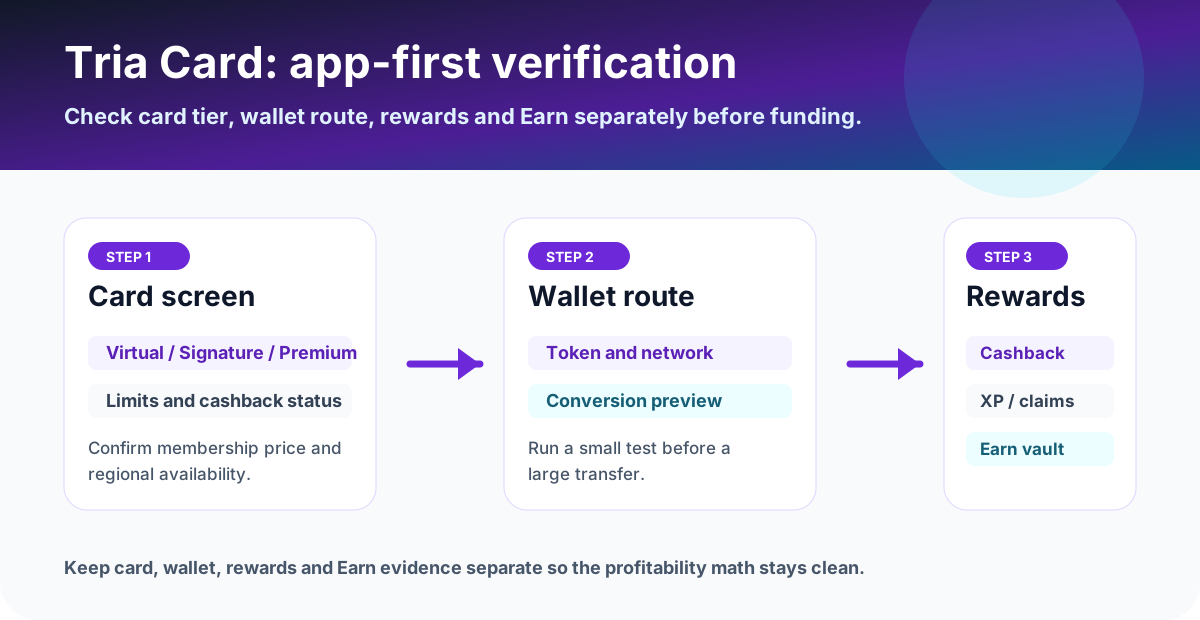
How Tria Earn works
Tria's help center says Earn lets users deposit supported assets into yield-generating vaults. It lists vault examples such as wBTC, USDC, and AUSD, and explains that the selected token may be converted into the vault asset.
That conversion matters. If you deposit an asset that is not the vault asset, check the preview and final received amount rather than only the APY headline.
Withdrawal fee and timing
The help center describes two withdrawal modes: instant withdrawal, where a 0.2% fee is deducted (about 30 minutes, up to 628.75 USD per withdrawal), and normal withdrawal, which can take 96 hours with no fee and no limit (checked October 1, 2026). A user who may need liquidity should value this difference before depositing.
Useful when speed matters, but the cost can eat into short-term yield.
No stated withdrawal fee in the help center, but slower access to funds.
Boosted APY and card tiers
Tria's Earn help article (checked October 1, 2026) says boosted rewards depend on your membership tier, Lite, Pro or Max (renamed from Virtual, Signature and Premium on September 26, 2026), with higher tiers earning more. Treat that as an extra reward layer, not a reason by itself to buy a card tier. Compare the membership cost with your expected Earn balance and the base APY. Tria's Earn help article adds that boosted rewards require a minimum 3-month lock-in (withdrawing earlier makes the position ineligible) and are paid in Tria tokens, separate from the base APY.
Simple breakeven check
If a paid card tier is required to unlock a higher Earn rate, compare the incremental APY against the card membership cost. For example, if a boost adds 2% APY, a $5,000 Earn balance produces about $100/year before risk and fees. That does not justify a high card-tier cost by itself.
Who should use it?
- Users comfortable with on-chain yield risk and APY changes.
- Users who can wait for normal withdrawal if they want to avoid the instant fee.
- Users who will save app screenshots of vault, APY, deposit amount, withdrawal mode, and final credit.
What to save before and after using the card
- Vault screen showing asset, APY, and whether APY is standard or boosted.
- Deposit preview showing any asset conversion before entering the vault.
- Withdrawal screen showing instant or normal route, fee, and waiting time.
- Final transaction history showing received amount and timestamp.
FAQ
What should I verify before applying, funding, or spending?
Open the official site or app and confirm the supported region, card availability, fee rows, reward terms, funding method, and any deadline shown on the account screen. If the condition is unclear, pause before applying or funding and compare the app display with the official help page.
Which records should I keep after using the card?
Keep the official page screenshot, application or KYC status, funding transaction, card statement, fee row, cashback or points entry, timestamp, currency, amount, and any TXID or statement number. Store them by month so support checks and later tax review are easier.
What should I trust if the app and this page differ?
Before applying, funding, or spending, use the latest official site or in-app screen as the source of truth. Treat this page as a decision checklist and save the live fee, reward, and availability screens.
Official sources checked
Terms change quickly. Use this page to narrow your choice, then confirm the final fee table, card availability, limits, and campaign terms in the official app or help center.
Official social and update checks
Earn APY and campaign conditions can move faster than evergreen help pages. Check official Tria channels before treating any APY or boost as current.