
Applying, physical cards and country checks
Application checklist checked 6 October 2026. Existing fee and ATM figures retain their own stated verification dates; check the app before ordering.
KYC levels and timing (checked 2026-10-13): KAST's verification levels article describes Level 1 (basic details), Level 2 (ID and selfie, which unlocks cards) and Level 3 (proof of address, for the USD account and payouts). KAST says automated review usually takes 10–15 minutes and a manual review 1–3 business days. KAST publishes no country list; the KAST supported countries guide explains how to check yours.
How do I get a KAST card?
Find the official app through KAST’s website and register with your real residence and identity details. Wait for identity approval and a card offer, then review the plan and cost before funding for card use. An unavailable-country message is a reason to stop, not to use a different address.
Which country is KAST’s bank or card issuer in?
KAST describes itself as a financial technology company, not a bank, and says licensed partners provide its cards and financial services. The app operator, card issuer and contract jurisdiction are different questions. Read the legal entity in your account terms and the issuer in your cardholder agreement; do not infer either from the app’s brand or a country label.
Can I apply from Japan and receive a physical card?
Merchant acceptance in Japan does not establish eligibility for Japanese residents or delivery to Japan. Check residence eligibility, card issuance and the shipping country separately. Before paying, save the delivery charge and order terms; after dispatch keep tracking details and activate the card as instructed.
What should I check for ATMs and tax records?
Check the card’s withdrawal fee and limit, ATM operator surcharge, currency conversion, PIN and activation. Tax treatment depends on your jurisdiction. For Japan, distinguish owning a card from gains on selling or using crypto; retain acquisition costs, transaction dates, units, yen values, fees and rewards, and consult the NTA or a qualified adviser.
KAST · 国税庁 / Japan NTA — No.1524
KAST card fees and membership comparison · KAST referral code and eligibility
Advertising: this registration button is our referral link. We may receive a reward if you qualify; benefits and card eligibility must be checked on the official screen.
- Standard (free): 1.5% USD cashback on the first $2,000 of card spend each month, so at most $30 a month. No KAST Points.
- Premium ($1,000 a year): 2% on the first $10,000 a month (at most $200), plus 1% back in KAST Points.
- Private ($10,000 a year): 3% on the first $40,000 a month (at most $1,200), plus 2% back in KAST Points.
- How it's paid: in US dollars into your Rewards balance when the card is authorised. It starts locked, you tap Redeem once it unlocks, and it pays for your next card purchases. It can't be withdrawn to a bank or wallet, and it doesn't expire.
- What earns nothing: ATM withdrawals, cash advances, money transfers, quasi-cash, fees, and refunded or reversed purchases. Eligibility follows the merchant category code (MCC).
Sources: KAST fee table (updated 2026-09-01), How Do Cashback Rewards Work on KAST? (updated 2026-09-18), the eligible-MCC article (updated 2026-08-31) and the membership page, all checked 2026-10-01. The maximums are our arithmetic from KAST's rates and caps.
KAST is strongest when you fund with supported stablecoins, spend in USD or with low FX drag, and can use the cashback without overpaying for a tier you do not need. For most people that means Standard: 1.5% back on up to $2,000 a month with no annual fee. The three June 2026 promotions this page used to track have all ended: Matchday 2x cashback on July 19, 2026, Ads Cashback on July 31, 2026, and the 0% FX card-spend promotion on August 31, 2026. Judge KAST on its standing fees and cashback, and check the official promotions page for anything newer.
What is KAST Card?
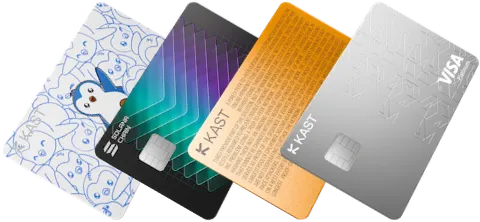
KAST is a crypto card and account product built around stablecoin deposits and card spending. The official card page presents Standard, Premium and Private tiers, with card materials, cashback, KAST Points on higher tiers, Apple Pay or Google Pay support, physical cards, and ATM access.
The key reader action is simple: open the official card page, select the card tier you are considering, then compare the fee page before ordering a virtual or physical card.
Official-site checks before opening an account
Do not stop at the KAST landing page. Open the card product page first, then the fee table, then the app or account screen where the card tier and country availability are shown.
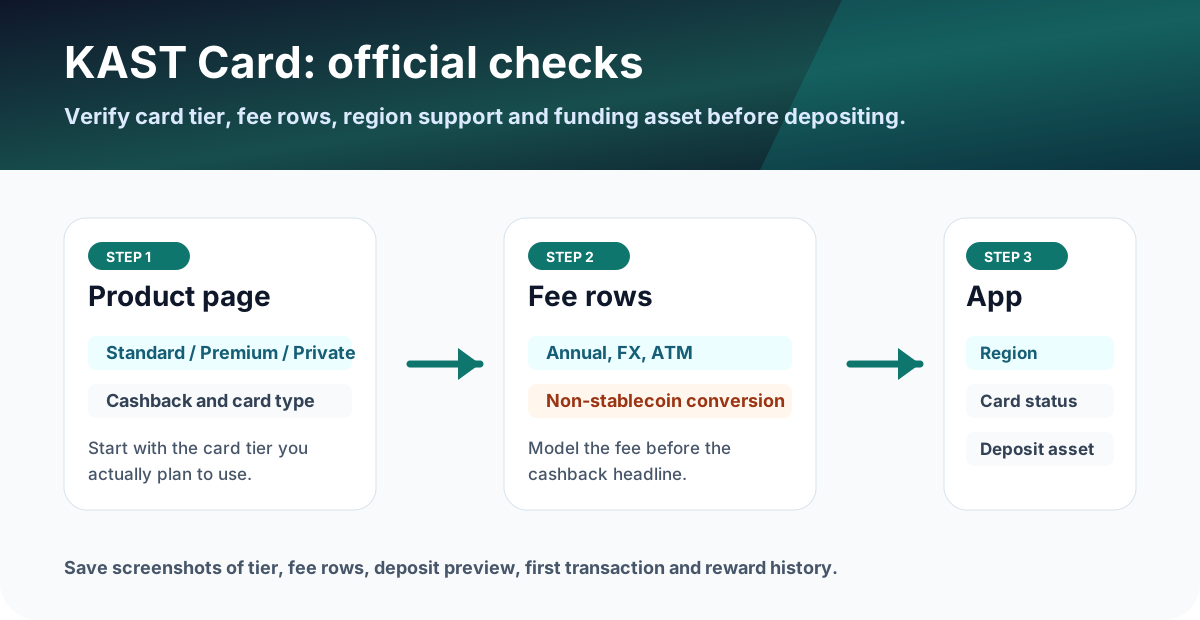
Where to check in the official flow
KAST fees that decide whether it is worth it
Standard has a $0 annual fee, while Premium and Private are paid tiers. The official fee table (updated 2026-09-01, checked 2026-10-01) lists Premium at $1,000 a year and Private at $10,000 a year, Standard physical card shipping at $40, non-USD FX at 0.5-1.75%, ATM withdrawals at $3 plus 2%, and a conversion fee for non-stablecoin deposits that varies by token and is shown in the app before you confirm.
That means KAST can look excellent for stablecoin users, but expensive if you deposit volatile tokens that are automatically converted or if you use ATMs often. The 0% FX promotion ended on August 31, 2026, so model the normal FX row for all non-USD spending.
ATM limit: as of 2026-10-13 KAST's official pages disagree. The ATM limits article (updated 2026-08-09) says $250 per withdrawal including fees and up to 3 withdrawals in a rolling 24 hours ($750), while the fees and conditions article (updated 2026-10-12) says up to $500 per withdrawal and up to 3 withdrawals or $1,500 per 24-hour period. Check the limit shown in the KAST app before withdrawing and plan around the lower $250 figure; the KAST ATM limit guide has the details.
| Check | KAST Card | Tria Card | RedotPay |
|---|---|---|---|
| Core angle | Stablecoin-to-USD card account with tiered cards. | Self-custody wallet spending with broad token support. | Stablecoin payment app with virtual and physical card options. |
| Cost headline | Standard $0 annual fee; Premium $1,000/year; Private $10,000/year. | Tier and availability must be checked in the app; tiers are Lite (20 USD a year), Pro and Max, renamed from Virtual, Signature and Premium on September 26, 2026. | Virtual/physical card fees plus optional RedotPay Pro membership. |
| Rewards | USD cashback: 1.5% on the first $2,000/month, 2% on the first $10,000/month, or 3% on the first $40,000/month; Premium adds 1% and Private 2% in KAST Points. | Help center table shows 1.5%, 4.5%, and 6% cashback by tier. | RedotPay Pro shows 3% Apple Pay and Google Pay cashback up to a monthly cap. |
| Fees to watch | Non-USD FX 0.5-1.75%; non-stablecoin auto-conversion fee varies by token; ATM $3 + 2%. | Confirm card tier, regional availability, Earn withdrawal route, and membership cost in the app. | Crypto conversion 1%; non-card-currency transaction 1.2%; ATM 2% or 3% depending on card and monthly amount. |
| Best fit | Stablecoin users who want transparent USD cashback. | Users who want broad token support and wallet-based spending. | Users who prefer an app-first card with clear conversion and Pro perks. |
0% FX promotion: ended August 31, 2026
This promotion ended on August 31, 2026. Card spend from September 1, 2026 pays the normal 0.5-1.75% FX fee. The section below is kept as a record of how it worked. KAST's 0% FX promotion terms said qualifying card-spend transactions had to be completed between June 1 and August 31, 2026. The offer was not worldwide, only selected eligible markets qualified, and users were told to contact Concierge to confirm eligibility.
The mechanics: FX was still charged at the time of spend, then a promotional credit equivalent to the FX fee could be applied after verification. Deposits, transfers, reversals, refunds, chargebacks, declined transactions and failed transactions did not qualify.
KAST Matchday 2x cashback: ended July 19, 2026
This campaign ended on July 19, 2026, and its terms page is no longer published. KAST's Matchday campaign ran from June 11, 2026 at 00:00 UTC to July 19, 2026 at 23:59 UTC. Eligible users opened the Matchday card in the KAST app, submitted one pick before kickoff, and a correct pick unlocked 2x cashback on eligible KAST card spend for 24 hours from 00:00 UTC the next day.
A similar mechanic returned on September 1, 2026: KAST's help centre describes a daily Rock Paper Scissors game in the app where a win doubles your tier's usual cashback rate for 24 hours from 00:00 UTC, subject to the normal caps and exclusions.
KAST Ads Cashback: ended July 31, 2026
This campaign ended on July 31, 2026, and its terms page is no longer published. KAST's June 15, 2026 blog described a campaign from June 15 to July 31, 2026 in which eligible KAST customers could earn 10% cashback on eligible TikTok Ads, Meta Ads, or Google Ads payments made with a KAST Card, subject to market caps and a reward pool.
A separate offer for business accounts is listed on KAST's promotions page (checked 2026-10-01): from September 1 to October 31, 2026 at 23:59 UTC, ad spend (MCC 7311) paid with a KAST Business Card earns 5% total cashback. It does not apply to personal KAST Cards.
KAST cashback by tier and breakeven logic
KAST's official fee table (updated 2026-09-01, checked 2026-10-01) shows USD cashback by tier with monthly caps: 1.5% on the first $2,000 of monthly spend on Standard, 2% on the first $10,000 on Premium, and 3% on the first $40,000 on Private. Spending above the cap earns no USD cashback that month. Premium and Private also earn KAST Points (1% and 2%), which are a separate reward, not cash.
| Tier | Annual fee | USD cashback | Monthly spend cap | Max cashback per month | KAST Points |
|---|---|---|---|---|---|
| Standard | $0 | 1.5% | $2,000 | $30 | None |
| Premium | $1,000 | 2% | $10,000 | $200 | 1% of eligible spend |
| Private | $10,000 | 3% | $40,000 | $1,200 | 2% of eligible spend |
When does Premium pay for itself? Our arithmetic, counting USD cashback only: Premium costs about $83 a month. Above $2,000 of monthly spend, Standard stops at $30 while Premium keeps paying 2%, so Premium only beats Standard once you spend about $5,670 a month on the card (2% of $5,670 is $113, which is $30 plus $83). If you value KAST Points at face value, the breakeven falls to about $3,780 a month, but Points are not cash and have no published cash value. Private, at about $833 a month, needs roughly $28,800 of monthly spend to beat Standard on cashback alone.
Using the cashback: KAST credits cashback at the moment of card authorisation. It starts locked, and KAST's rewards article mentions a 14-day lock period. You then tap Redeem, and the amount is used first on your next card purchases. Redemption is manual, and KAST's cashback rewards article (updated 2026-09-18) says cashback can't be withdrawn to a bank or external wallet: it can only be spent through KAST, and you need at least $0.10 in your main balance for redeemed cashback to apply. It doesn't expire. Refunded purchases can have their cashback clawed back.
Boosted days: from September 1, 2026, KAST's promotions page and help centre describe a daily Rock Paper Scissors game in the app. A win doubles your tier's cashback rate for 24 hours, within the normal caps and exclusions.
For a quick check, do not start with the highest reward rate. Start with your expected monthly card spend, subtract FX or conversion costs (see the KAST fees and conversion rate guide), then compare the result with any annual membership fee.
FX could be $5 to $17.50. A 1.5% cashback headline is $15 before considering caps, exclusions, and live issuer terms.
This is a simplified reader-side estimate, not a guarantee.Stablecoin deposits are listed as 0%, while non-stablecoin auto-conversion carries a fee that varies by token and is shown before you confirm.
KAST Points: no standard token launch (update)
KAST's KAST Points help article (updated 2026-09-10, checked 2026-10-13) says KAST is no longer planning a standard token launch for points. It says KAST is exploring a different structure instead, targeted for Q4 2026. Until KAST publishes that structure, don't value Points as a future token or count on a points airdrop.
Complete the KAST decision in three checks
Use the same order every time so the cashback headline does not hide conversion or ATM costs.
Start with Standard unless your expected monthly spend clearly justifies a paid tier.
Check non-USD FX, non-stablecoin deposit conversion, ATM, small transactions, and physical-card shipping.
The 0% FX promotion ended on August 31, 2026. Check the official promotions page for current offers and their end dates before counting on them.
Advertising disclosure: the KAST button is our referral link (code JQDMB03P), and we may be paid if you sign up. It does not change the cashback or fees described here.
Who should consider KAST?
- Users who already hold supported stablecoins and want a card-first spending setup.
- Users who care about physical card, Apple Pay or Google Pay, and ATM availability.
- Users who will verify caps, country support, and fees before depositing serious funds.
- EEA and UK users leaving Gnosis Pay who are comfortable with a custodial card; the Gnosis Pay alternatives guide compares KAST with the other options.
What to save before and after using the card
- Screenshot of the KAST tier page showing Standard, Premium, or Private conditions.
- Screenshot of the fee table rows used in your decision, especially FX, ATM, and deposit conversion.
- If you took part in the 0% FX, Matchday or Ads Cashback promotions before they ended, the related card transactions and credit or cashback entries.
- Screenshot of any current promotion you join, including its end date.
- Deposit transaction hash and app balance after a small test deposit.
- Card transaction history, FX charge, and cashback or KAST Points history after the first purchase.
FAQ
How much cashback does the KAST card give?
KAST pays USD cashback by membership tier: 1.5% on the first $2,000 of card spend each month on the free Standard tier, 2% on the first $10,000 on Premium ($1,000 a year) and 3% on the first $40,000 on Private ($10,000 a year). That caps monthly cashback at $30, $200 and $1,200. Premium and Private also earn 1% and 2% in KAST Points. Checked on KAST's fee table and membership page on 2026-10-01.
Is KAST Premium worth $1,000 a year?
Only for heavy card spenders. Counting USD cashback alone, Premium beats the free Standard tier once you spend about $5,670 a month on the card, because Standard's cashback stops at $30 a month while Premium pays 2% up to $10,000. If you count KAST Points at face value the breakeven is about $3,780 a month, but Points are not cash. This is our arithmetic from KAST's published rates.
How do I use KAST cashback?
Cashback is added to your Rewards balance when the card is authorised and starts locked. Once it unlocks, tap Redeem in the app and the amount is used first on your next card purchases. It cannot be withdrawn to a bank or external wallet, it does not expire, and ATM withdrawals, transfers, fees and refunded purchases do not earn it.
Did KAST's 0% FX promotion end?
Yes. The official promotion terms described a credit-back style offer for qualifying card spend with eligible foreign exchange conversion from June 1 to August 31, 2026, limited to selected eligible markets with monthly caps. It ended on August 31, 2026, and card spend from September 1, 2026 pays the normal 0.5-1.75% FX fee.
Is KAST Matchday 2x cashback still running?
No. KAST Matchday ran from June 11 to July 19, 2026 and has ended; its terms page is no longer published. A correct in-app pick unlocked 2x the base cashback rate for 24 hours. Since September 1, 2026, KAST's help centre describes a daily Rock Paper Scissors game that doubles your tier's cashback rate for 24 hours after a win.
Is KAST Ads Cashback still running?
No. The 10% Ads Cashback campaign for TikTok Ads, Meta Ads and Google Ads payments ran from June 15 to July 31, 2026 and has ended. KAST's promotions page lists a separate 5% total cashback offer on ad spend for KAST Business Cards from September 1 to October 31, 2026; personal KAST Cards are not eligible.
What should I verify before applying, funding, or spending?
Open the official site or app and confirm the supported region, card availability, fee rows, reward terms, funding method, and the end date of any promotion shown on the account screen. If the condition is unclear, pause before applying or funding and compare the app display with the official help page.
Which records should I keep after using the card?
Keep the official page screenshot, application or KYC status, funding transaction, card statement, fee row, cashback or points entry, timestamp, currency, amount, and any TXID or statement number. Store them by month so support checks and later tax review are easier.
What should I trust if the app and this page differ?
Before applying, funding, or spending, use the latest official site or in-app screen as the source of truth. Treat this page as a decision checklist and save the live fee, reward, and availability screens.
Official sources checked
Cashback rates, caps, fees and promotion statuses on this page were re-checked against the pages below on 2026-10-01. Terms change quickly, so confirm the final fee table, card availability, limits, and campaign terms in the official app or help center before you act.
Official social and update checks
Check official social accounts for campaign changes, app incidents, region changes, maintenance notices, and posts that are newer than help-center articles.