

Tria is a good card for people who already keep crypto in a self-custodial wallet, spend a steady amount each month, and want to pay by Visa from a wide range of tokens. Its headline 1.5%, 4.5% and 6% cashback is real but capped: the high rate stops at 1,000 USD (Lite and Pro) or 2,000 USD (Max) of spend a month, then drops to 0.5% on Lite and 1% on Pro and Max. Since Tria's September 26, 2026 announcement, Lite (formerly Virtual) costs 20 USD a year; Pro (formerly Signature) and Max (formerly Premium) are 109 USD and 250 USD a year in the card terms, so they only pay off with regular spending near the cap. Treat the card balance as spending money: in August 2026 a flaw at Tria's card issuer Rain hit 636 users' card balances, and Tria refunded all of them in full plus an extra 10%.
Who the Tria Card suits, and who should skip it
You keep stablecoins or other tokens in a self-custodial wallet, top up what you plan to spend, and spend a similar amount each month. Lite at 1,000 USD a month returns up to 15 USD, Pro up to 45 USD; Max at 2,000 USD returns up to 120 USD.
Tria Travel bookings earn the tier rate outside the monthly cap, and Pro or Max adds ATM access (750 USD per withdrawal). But the card terms allow FX and international fees, and lounge visits are paid per entry.
Spend above the cap earns 1%, so heavy spenders get far less than the headline. Card balances sit in a card contract, not your wallet, so storing savings on the card adds risk you do not need.
What the Tria Card really costs
| Cost | Lite (formerly Virtual) | Pro (formerly Signature) | Max (formerly Premium) |
|---|---|---|---|
| Price | 20 USD a year (September 26, 2026 announcement; free offer ended) | 109 USD a year (card terms; not restated) | 250 USD a year (card terms; not restated) |
| ATM | Not available | 1 USD + 1%, up to 750 USD per withdrawal | 1 USD + 1%, up to 750 USD per withdrawal |
| FX and international | 0% Tria FX per the help center (Visa FX may apply); card terms allow FX up to 3% and international transactions up to 1% | ||
| Top-ups | No direct Tria fee per the help center; a provider fee can apply to swaps or bridging; minimum 10 USD (50 USD for Bitcoin) | ||
Tria has made no official statement on whether existing Virtual holders keep their old terms. The 20% first-purchase discount (Signature 87 USD, Premium 200 USD) ran from August 17, 2026 and ended on September 11, 2026, according to Tria's discount post. Full details and the ATM worked example are in the Tria Card fee guide.
Cashback: the headline rate versus the monthly cap
Tria's Card Cashback Terms (last updated June 1, 2026) set a monthly spend cap per account, based on your highest card tier. The cap resets on the first of each month. Tria's membership announcement of September 26, 2026 raised the Lite cap from 100 USD to 1,000 USD and kept Pro and Max benefits unchanged.
| Tier | Rate inside cap | Monthly cap | Rate above cap | Most you earn inside the cap |
|---|---|---|---|---|
| Lite | 1.5% | 1,000 USD | 0.5% (announcement and cashback terms; the What are Tria Cards? table showed 1%) | 15 USD |
| Pro | 4.5% | 1,000 USD (announcement and cashback terms; the help-center articles What are Tria Cards? and Cashback General Information showed 2,000 USD on October 1, 2026) | 1% | 45 USD |
| Max | 6% | 2,000 USD | 1% | 120 USD |
1,000 USD at 1.5% (15 USD) plus 500 USD at 0.5% (2.50 USD) = 17.50 USD, before exclusions.
1,000 USD at 4.5% (45 USD) plus 500 USD at 1% (5 USD) = 50 USD, the same worked example Tria's terms use.
2,000 USD at 6% (120 USD) plus 1,000 USD at 1% (10 USD) = 130 USD, before exclusions.
Three rules change the value. Tria Travel bookings paid with a Tria Card earn 1.5%, 4.5% or 6% outside the cap, according to Tria's Tria Travel announcement. ATM and cash withdrawals, gaming, gambling, cash-like purchases, P2P and account-funding transfers, repayments and refunded transactions earn nothing. And cashback is not instant: the help center says it is paid in USDT on Arbitrum in periodic batches, while the terms allow distribution up to 12 months after each cashback period. Staking badge boosts exist, but the Tria Travel post says staking badges are unavailable to new users, so model your value without one. For the Max (Premium) math, see the Max cashback cap guide.
Self-custody: your wallet and your card balance are different places
Tria's wallet is self-custodial. When you create an account you get a 12 or 24 word seed phrase, and Tria's help center says it cannot reset or recover that phrase for you. Tria's card help article describes the card as spending your crypto without pre-selling it on an exchange, with conversion at payment time through its BestPath routing.
In practice the card spends from a card balance. Tria's Top Up guide (updated July 10, 2026) says top-ups from your wallet are converted and credited to your card balance, with a 10 USD minimum for most tokens and 50 USD for Bitcoin. Tria's own statement after the August 2026 incident spelled out the difference: wallets and card balances live in different places, and topping up with Solana assets moves the money into a separate Solana card contract. The wallet stays under your control; the card balance does not. Keep only what you plan to spend soon on the card.
The August 29, 2026 card-balance incident at Rain
On August 29, 2026, Tria said on X that its card-issuing partner Rain had found a vulnerability in a Solana card contract used by Tria and other Rain program cards. The contract was upgraded and fixed, and Tria reported that reconciliation showed 636 affected users and 431,945 USD of card balances. Tria wallets on EVM chains, Aptos, Solana and others were not affected. Later the same day, Tria posted that every affected user had received a full refund plus an extra 10%.
Our reading: the response was fast and users were made whole, which counts in Tria's favour. The incident also confirms that the card balance carries issuer and smart-contract risk that the self-custodial wallet does not. That is the main safety point to weigh before topping up large amounts.
Does the TRIA token matter for cardholders?
Only a little. Tria Foundation published TRIA tokenomics in February 2026, when the token launched. On August 28, 2026 the Foundation extended the team and investor lock-up, moving their first unlock from February 2027 to February 2028. Card cashback is paid in stablecoins, not TRIA, and the token schedule does not change cashback rates or caps. TRIA matters to cardholders mainly through staking badges, which can add a boost inside the monthly cap; Tria's Tria Travel post (June 22, 2026) says staking badges are unavailable to new users.
Joining Tria: the access code step
Tria's sign-up help says an access code is required to join during its phased rollout. You enter it after choosing Google or Apple login. New users can then earn 3,200 points and 5 USDT through Tria's Activate & Earn campaign by activating the card and making four payments of 5 USD or more. The Tria access code guide covers where the code goes, both official referral programmes, and why codes that promise 6% on everything do not match Tria's terms.
Tria app screens to check before funding
Tria's value depends on the live app state. Check the card tier, card balance, supported network, top-up preview and reward screen before using the card seriously.
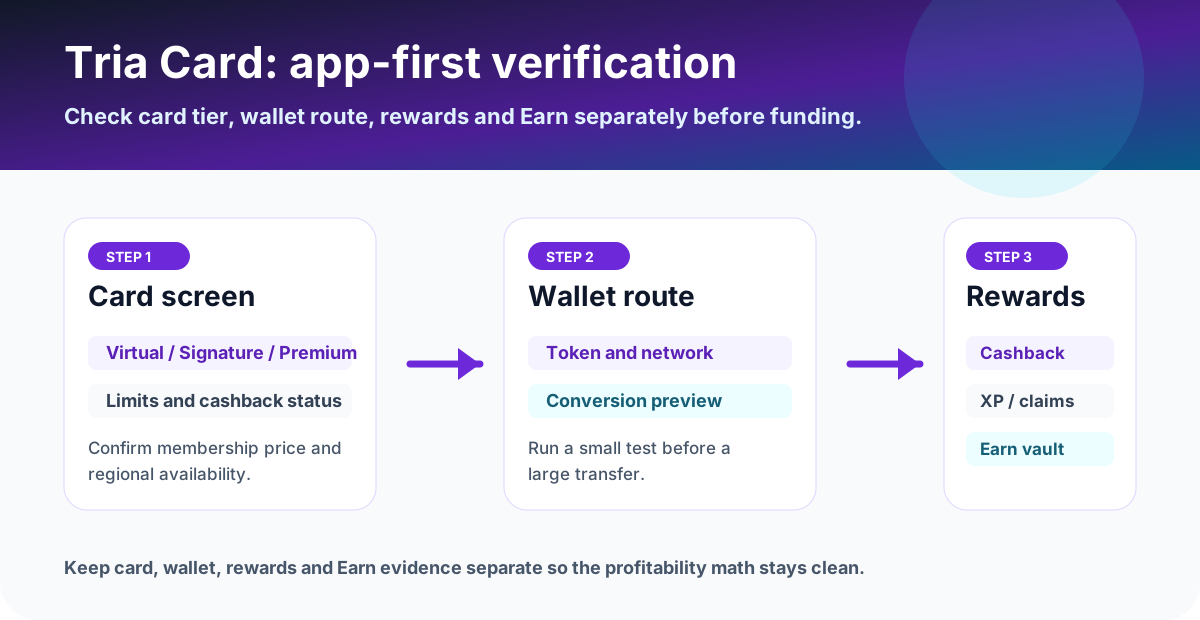
Complete the Tria check before a large deposit
Use a small test first, then only scale if the card, wallet, and rewards screens match your expectations.
Confirm your country in the app dropdown and the tier price on the Membership screen.
Pick the tier whose monthly cap matches what you actually spend by card.
Top up a small amount, make one payment, and check the card history and Rewards separately.
What to save before and after using the card
- Membership screen showing tier, price, renewal date and country.
- Cashback screen showing rate, monthly cap, above-cap rate and pending or paid cashback.
- Top-up preview, network, TXID and the card balance after the top-up.
- Card transaction history, including currency and any FX or international fee row.
- Reward and campaign screens with dates, in case a payment is classed as excluded.
FAQ
Is the Tria Card worth it?
It is worth it if your monthly card spend sits near a tier's cap. Pro (formerly Signature, 109 USD a year in the card terms) pays 4.5% on up to 1,000 USD a month, at most 45 USD; Max (formerly Premium, 250 USD a year) pays 6% on up to 2,000 USD a month, at most 120 USD. Above the cap they earn 1%. Lite (formerly Virtual) costs 20 USD a year since Tria's September 26, 2026 announcement and pays 1.5% on the first 1,000 USD a month, then 0.5%, so it covers its fee after about 1,333 USD of eligible spend. Low or irregular spenders get the most from Lite; heavy spenders get far less than the headline rate.
Is the Tria Card safe?
Tria's wallet is self-custodial, but money you top up to the card sits in a separate card balance. On August 29, 2026, Tria said a vulnerability in a Solana card contract at its issuing partner Rain affected 636 users and 431,945 USD of card balances, that Tria wallets were not affected, and later the same day that every affected user had been refunded in full plus an extra 10%. Keep only near-term spending on the card.
How much does the Tria Card cost?
Tria's membership announcement of September 26, 2026 renamed Virtual, Signature and Premium to Lite, Pro and Max. Lite costs 20 USD a year and the limited-time free Virtual offer has ended. Pro and Max prices were not restated; the card terms list 109 USD and 250 USD a year, so confirm the charge in the app's Card tab. The 20% first-purchase discount ran from August 17, 2026 and ended on September 11, 2026. ATM withdrawals cost 1 USD plus 1% on Pro and Max.
Is Tria cashback unlimited?
No. Tria caps the headline rate by eligible spend a month: 1,000 USD on Lite (formerly Virtual, raised from 100 USD on September 26, 2026), 1,000 USD on Pro (formerly Signature) and 2,000 USD on Max (formerly Premium). Above the cap, Pro and Max earn 1% and Lite earns 0.5% according to the announcement and cashback terms; the What are Tria Cards? table showed 1% when we checked on September 26 and October 1, 2026. On October 1 that table and the Cashback General Information article also listed Pro's cap as 2,000 USD, not the 1,000 USD in the announcement and terms, so check the app. ATM, gambling, P2P transfers and other excluded transactions earn nothing.
Does Tria Travel count toward the cashback cap?
No. Tria's Tria Travel announcement (June 22, 2026) says bookings of hotels, flights, concerts, cruises and VIP experiences paid with a Tria Card earn 1.5%, 4.5% or 6% by tier and do not count toward the monthly cashback cap. Cancelled or refunded bookings do not qualify.
Is Tria self-custodial?
The Tria wallet is. You hold a 12 or 24 word seed phrase that Tria cannot recover. The card is funded by topping up a card balance from your wallet, and Tria has said that card balances live separately from wallets, so the card balance is not self-custodial in the same way.
Do I need an access code to join Tria?
Tria's sign-up help article says an access code is required to join during its phased rollout, entered after you choose Google or Apple login. Codes come from the waitlist or from existing users and ambassadors. New users can then earn 3,200 points and 5 USDT through Tria's Activate & Earn campaign.
Official sources checked on September 26 and October 1, 2026
Terms change quickly. Use this page to decide, then confirm the final fee table, card availability, limits, and campaign terms in the official app or help center.
Official social and update checks
Tria posts incidents, campaign changes and region updates on its official accounts before help articles catch up. Check the post date before acting on any of them.